
How to register in the U. S. Copyright OfficeHow to request your sales’liquidation?

Detect if someone is using your images

June 30th, 2011

Marta Palacio

Now you can know who is publishing your desings or images without permission in a simple and efficient way.

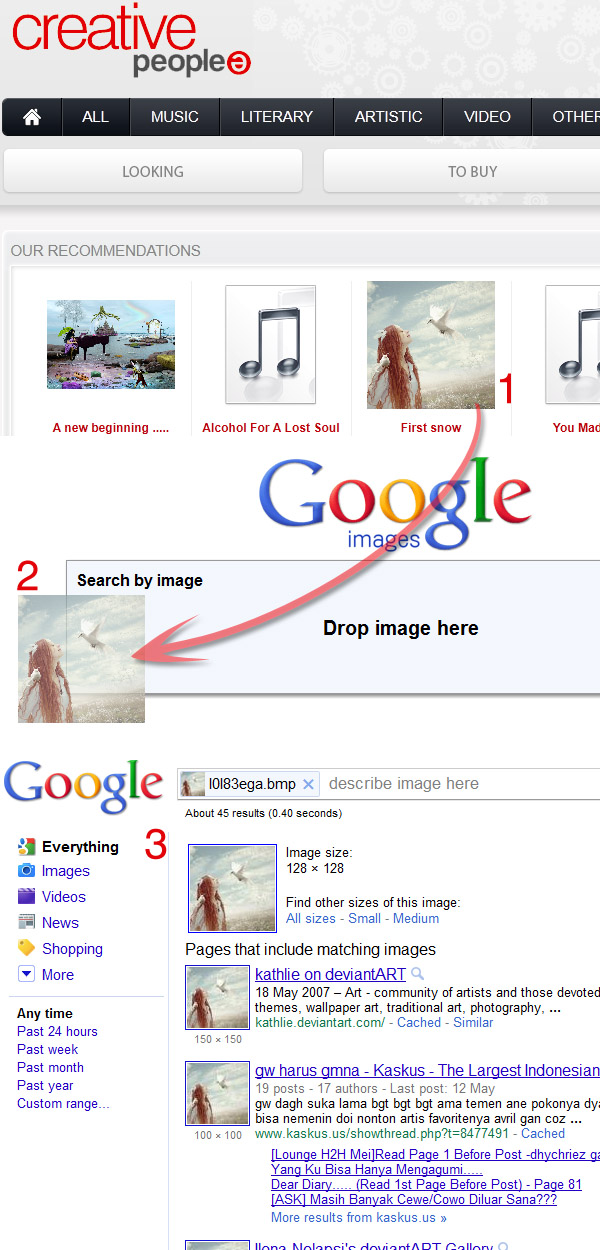
You only need a Chrome browser (by now it doesn’t work with others) and Google image search.

Open two windows: one with the photography you want to look for, and the other one with the searcher.

Drag the image to the searcher bar and… voilĂ !

And remember that in order to report your rights and have a proof of authorship, you have the on-line intellectual property registry of Safe Creative.
Entry Filed under: news

Leave a Comment

Required

Required, hidden

Some HTML allowed:
<a href="" title=""> <abbr title=""> <acronym title=""> <b> <blockquote cite=""> <cite> <code> <del datetime=""> <em> <i> <q cite=""> <strike> <strong>

Trackback this post  |  Subscribe to the comments via RSS Feed


Safe Creative

Categories

Calendar

June 2011
M T W T F S S
« May   Jul »
 12345
6789101112
13141516171819
20212223242526
27282930  

Posts by Month

Posts by Category

RSS